

Inside the LinkedIn content system I built in a weekend
Research scraper, lookalike content generator, etc

Every morning before I open LinkedIn, I open a localhost dashboard on my laptop. It tells me what to post about, which of my themes I’ve been neglecting, what’s trending in my niche, who engaged with content in my ICP yesterday, and which of my old posts is due for a repost.
It’s called Content Machine 2000. I built it in a weekend with Claude Code and zero engineering background. It runs the entire content side of my business, from ideation to analytics to outreach, and it replaced four SaaS subscriptions in the process.
This is a walkthrough of what it actually does and how I use it day-to-day. If you’re a creator or founder publishing regularly, you’ll walk away with a blueprint you can copy, modify, or steal outright.
Why I built it
The short version: I tried Taplio. I tried the alternatives. None of them fit how I actually research, draft, and iterate. So I went manual, spending 45 to 90 minutes a day scrolling LinkedIn and X, bookmarking posts, and pattern-matching by hand. When you’re publishing 5 times a week, that math gets ugly fast.
The bigger problem wasn’t the time. It was that staring at a feed hoping for inspiration is a terrible ideation process. I needed something that surfaced patterns from real engagement data, not whatever the algorithm wanted to show me that morning.
Eight hours of focused work later, four for the MVP, four more for polish across a week and I had a tool that does more than any SaaS I’d ever paid for.
What Content Machine 2000 actually does
It’s seven features, all running locally on my machine, talking to LinkedIn through Apify’s API (which runs scrapers on their servers).
1. Morning briefing
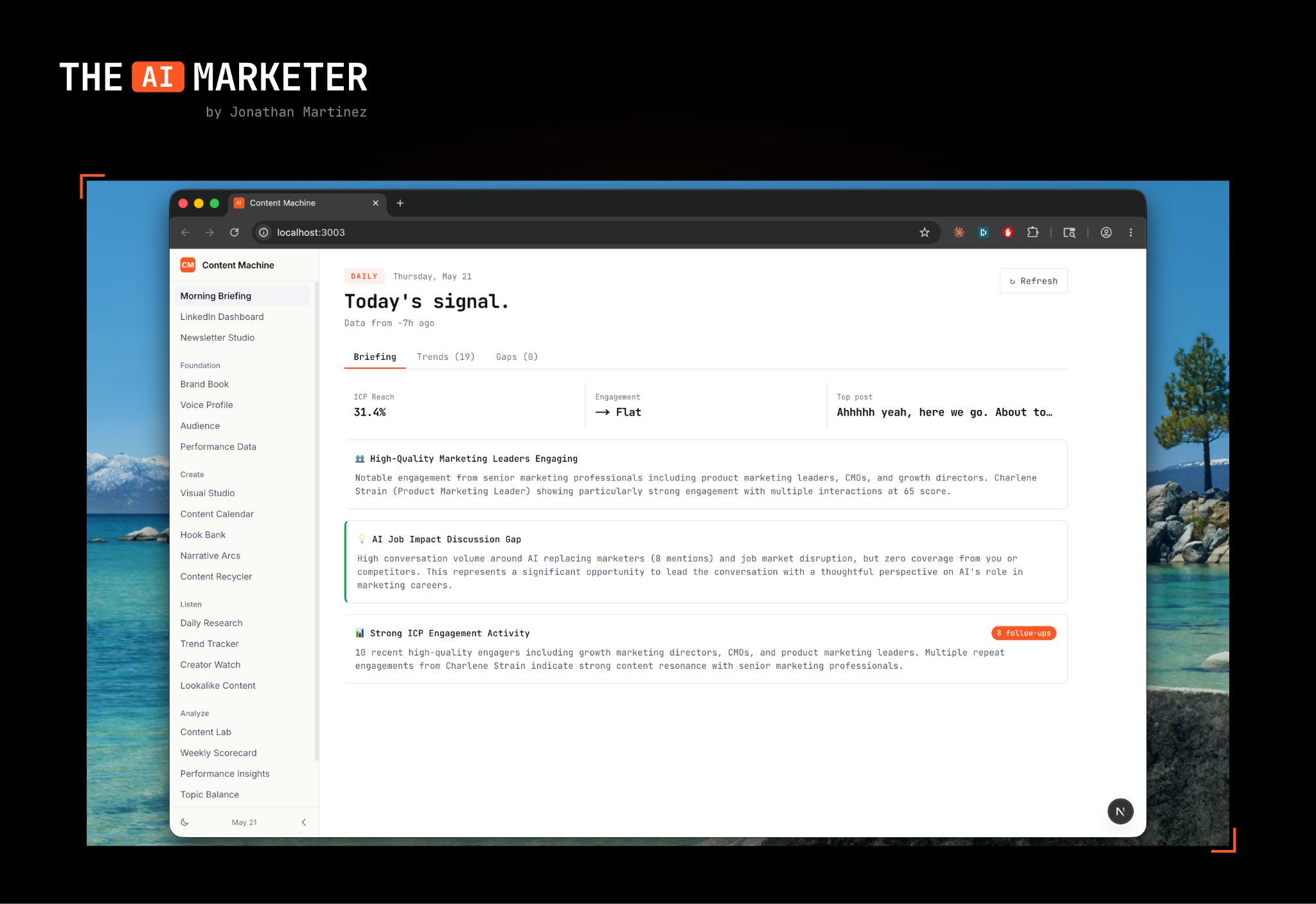
The first screen I see every day pulls my engagement stats from the last 24 hours and the trailing week, surfaces my top three performing posts, and flags content pillars I haven’t covered recently.
Think of it as a daily standup with myself, except the data is already on the screen before I sit down with coffee.
2. Research scraper
Finds the top-performing AI and marketing posts on LinkedIn from the past 24 to 72 hours. I see what’s resonating in my niche before I open the app which means I’m not making decisions based on whatever the algo decides to feed me.
The key word here is signal. The scraper sorts by real engagement, not virality theater. I’d rather see a 200-comment thread from a peer I respect than a 50,000-impression post from a guru clipping someone else’s idea.
3. Trend tracker
This clusters topics getting the most engagement in my niche and surfaces the themes that are picking up momentum. Recently it flagged “job market disruption and the junior marketing crisis” which was a topic that wasn’t on my radar at all.
I wrote a post about junior marketers off the back of that signal. It beat my typical impression count (I usually land 2,500 to 3,500 per post). I wouldn’t have come up with the angle on my own.
That same trend sparked a second post (“Can we stop AI bro marketing?”) which was a take on people claiming they’ve replaced their entire marketing team with one Claude subscription. The trend tracker connected something the data was showing with something I’d already been noticing.
4. Lookalike content generator
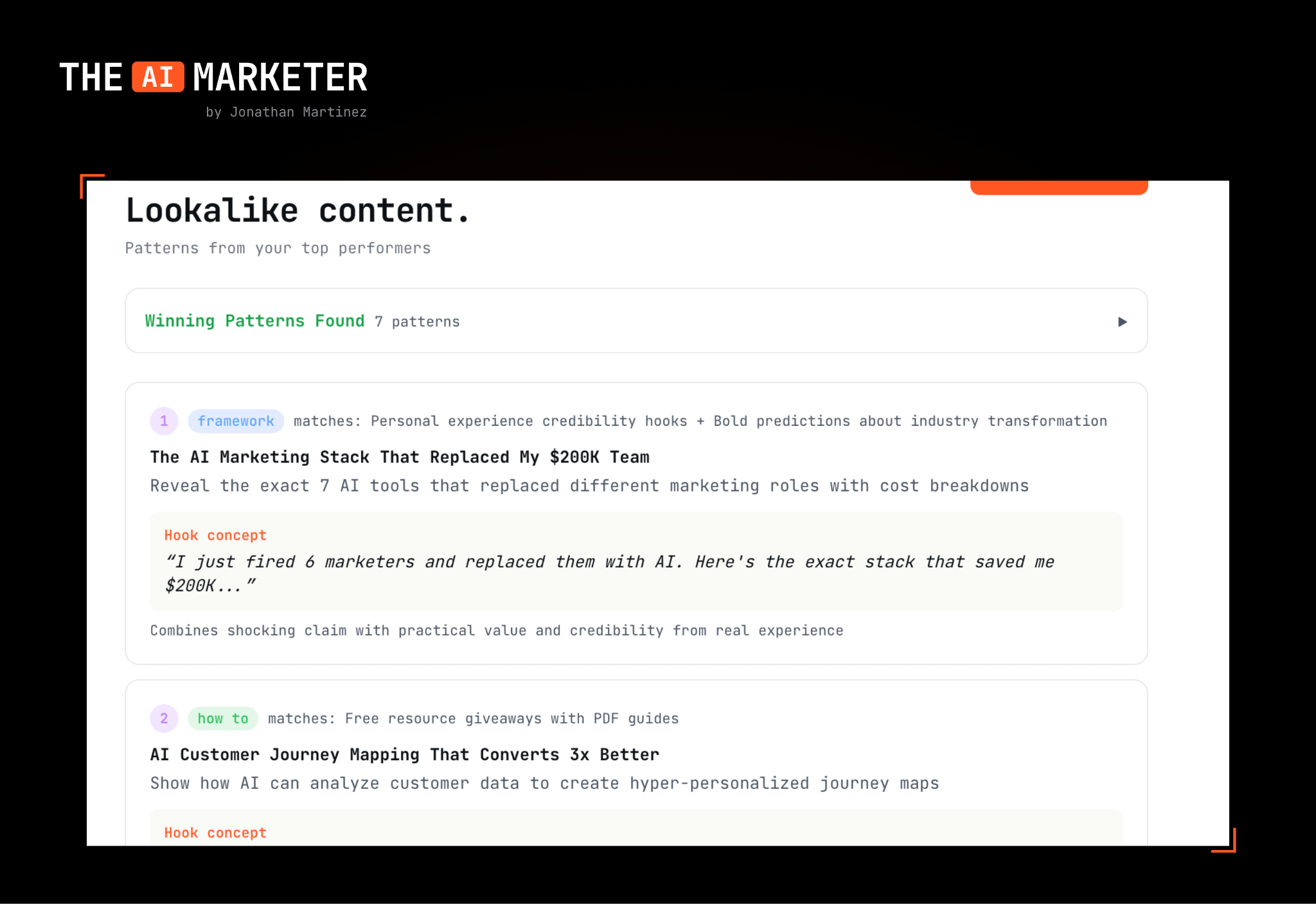
This takes my top-performing posts and generates new angles on them.
If a post about hiring globally hits big, the tool doesn’t spit out a rewrite. It surfaces five adjacent angles: the operations side, the cost side, the talent quality side, the timezone side, the cultural side. I pick the one I have a real opinion on and write that one myself.
5. Narrative arcs
Probably the most useful feature in the whole tool, and the one I’ve never seen in any off-the-shelf product.
It tracks my content pillars (the recurring themes I write about) and shows how long it’s been since I last posted about each one. Right now my dashboard reads something like:
Claude Marketers Academy: 8 days
GrowthPair: 33 days
AI tools for marketers: 4 days
Personal/founder lessons: 12 days
Hiring & talent: 19 days
I rotate between 3 to 5 pillars a week based on that data. It prevents fatigue on any single topic and keeps me from accidentally ghosting a pillar for a month. The repost feature ties into this: I used the narrative arc to time a repost about Claude Marketers that hit 101,730 impressions because the data showed it had been long enough since I’d touched the topic.
This is the kind of feature that only exists when you build for yourself.
6. Content recycler
Identifies past top performers that are worth reposting. Reposts typically pull about 80% of the original engagement on my account, which means my best thinking compounds instead of evaporating from the feed after 48 hours.
For a creator publishing daily, this is gold. Half the battle is realizing the post you wrote four months ago is better than anything you’d write today on the same topic.
7. Engagement scraper
Finds people engaging with content in GrowthPair’s ICP: VPs of marketing, founders, growth leads at venture-backed companies. I get a list of warm signals every morning that I can then DM.
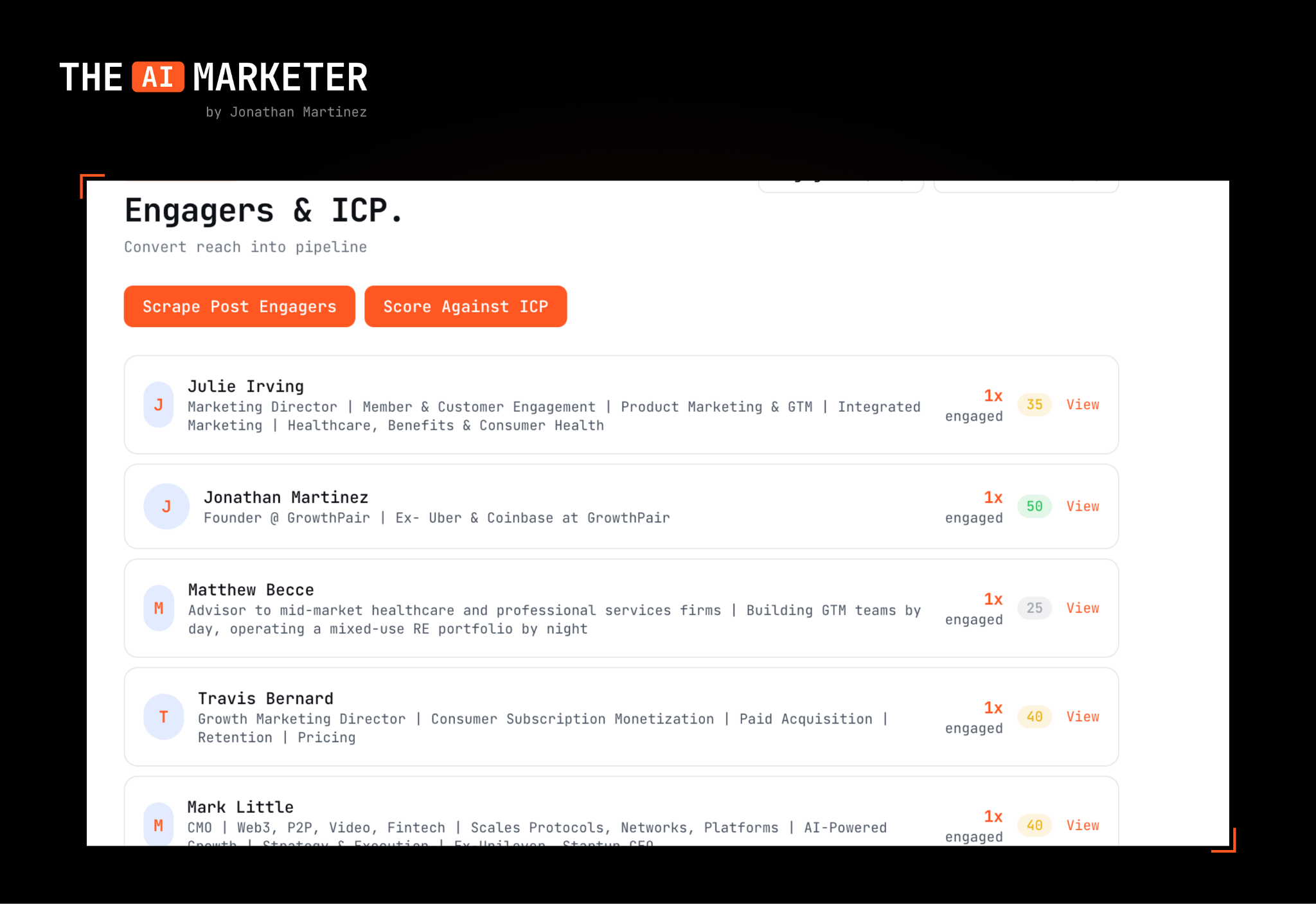
This feature is still a bit experimental but going to be testing some outbound with those that engage with my content. It’s definitely much more warm once they’ve seen my content, rather than a cold pitch.
A morning with Content Machine 2000
Here’s what a typical Monday looks like.
6:30 AM. I sit down with coffee, open the dashboard. Morning briefing tells me yesterday’s post landed at 4,200 impressions, my GrowthPair pillar is at 33 days (overdue), and the trend tracker flagged two new conversations picking up steam in the AI marketing space.
6:40 AM. I pull from the lookalike generator. My top post from last week was about AI hiring, and the tool surfaced an angle about how junior marketers are getting squeezed. I write a draft, and publish it on LinkedIn.
7:00 AM. Post goes live. I respond to comments for 20 minutes.
9:00 AM. I check the engagement scraper. Three names from real target companies showed up. I send two short, specific DMs about their comments on the post.
Total time spent on content for the day: ~20 minutes. Before the tool, it was closer to 3 hours, most of it scrolling.
What I deliberately didn’t build
This matters as much as what I did build.
Post generation: Content Machine 2000 doesn’t write a single word that goes on my LinkedIn. I prototyped a “draft the post for me” feature early and killed it inside a week. The value of thought leadership collapses the moment the thinking isn’t yours. The tool makes me faster at finding what to say but doesn’t decide what I say.
Auto-posting and auto-scheduling: Programmatic posting carries real risk of LinkedIn flagging the account. Manual posting takes 30 seconds and isn’t worth the tradeoff.
A “send me notifications” layer: I want this to be a place I go rather than a thing that pings me (I get enough notifications already).
If you take one thing from this section: build the parts of your workflow that are hard to do well manually.
What this has changed
The first is that writer’s block has basically stopped happening. Not because the tool writes the posts, but because every morning I sit down already knowing three to five things worth saying. The trend tracker, narrative arcs, and lookalike generator stack into a continuous queue of starting points. The gap between “what do I post today?” and “here’s the thing I’m posting about” closed from 45 minutes to about 90 seconds.
The second is harder to quantify. Building this thing made me a better marketer because I had to make every workflow assumption explicit. Every time I added a feature, I had to define what I actually cared about, what counted as a “top post,” what counted as a “pillar,” what counted as ICP engagement. Forcing myself to define it sharpened the whole operation.
And finally, this tool has definitely added much more pipeline for GrowthPair through the posts I’ve written because of the features. Hard to quantify this one as well since organic isn’t the easiest to attribute, but I do know business has picked up since having more data fuel what I write on social.
What it costs and what it replaced
The whole stack costs me about $15 a month across Apify API calls and a small Claude subscription overhead. The tools it replaced ran me roughly $50 to $150 a month each, and they did less.
There’s no maintenance burden in the way you’d expect from custom software. It’s a tool I built for one user, hosted on localhost. When something breaks I describe it to Claude and it gets fixed in the same session.
How to think about building your own
A few principles, since I get asked this constantly:
Document the thing you do every Monday morning, then ask Claude to build it.
Before any build session, say “ask me clarifying questions before you start writing code.” This single instruction surfaces edge cases you hadn’t considered and saves hours of rework.
Feed it everything you have including your past posts, your analytics exports, your style guide, your ICP definitions, etc.
Build the MVP in one afternoon, then live with it for a week before adding features.
Block out 2 to 3 hours for your first session. There’s a learning curve, but the “aha moment” almost always lands inside of the first feature working live.
Using GStack (Garry Tan’s Claude skills) feels like I added a jetpack to Claude Code. I highly recommend everyone check it out if you’re serious about building.
Why this matters for creators
For the past decade, the rule was: pick the SaaS that’s closest to your workflow and live with the compromises. There’s never been a single SaaS that was perfect for my use case.
Off-the-shelf tools are built for the median user. The median creator doesn’t have your audience, your pillars, your posting cadence, your ICP, or your analytics priorities. And for the first time, the cost of building exactly what you need is low enough that settling for “close enough” is merely a choice.
Content Machine 2000 isn’t special. It took eight hours and runs on a localhost server. Any creator with a clear sense of how they work can now have software shaped to that sense. Just a few focused afternoons, some cold brew and a willingness to spell out what you actually want is all you need.
If you’ve been waiting for permission, this is it. Get after it and build your one-of-one SaaS.
–

.
Hey! Absoluteky LOVED all of this post. Thanks for sharing!
How much does it costs to run the whole system per post?