
Future marketing teams will live in Github

I remember being on the early Postmates growth team in 2018 and the amount of tools we used to house information could likely fill this whole page. Okay, maybe not, but still. We used Gdocs, Gsheets, Tableau, Amplitude, AppsFlyer, Dropbox, etc.
This setup was the norm for a growth team. Looking for docs for hours, or hunting someone down to understand what things changed seemed par for the course. Oh, and don’t get me started on the file naming chaos: Female_Photoshoot_SF_032018_v3_FINAL.png.
Marketers have been dreaming of a better way (not just me?), and it’s been sitting in plain sight in front of us on the product/ engineering teams. Github.
I believe that housing all files inside of Github will be the future state of how a marketing team operates. I’m already doing this at my startup and it’s been a game changer with how fast I move and the amount of context-sharing I can do with everything sitting in the same place.
I’m here to show you just how easy it is to build this setup for your team. Let’s Git.
First, what’s Github?
For those that haven’t started coding up projects on Claude Code, let me give you a brief introduction along with key terms. Github has been around since 2008 and is a platform for developers (and now, marketers!) to create, manage and share their code.
A few key terms to know before we dive in:
Git: A version control system that tracks changes to code over time. Claude Code integrates deeply with Git.
Commit: A saved snapshot of your code at a specific point in time, with a message describing what changed.
Repo: A project folder tracked by Git, containing all your code and its full change history.
It’s basically a much more advanced Notion or Google Docs, at least in the way that we’re going to be using it for marketing.
Use cases for marketing team on Github
Before demonstrating how to do all this, I want to show how my current setup looks like for my startup. Here’s a snapshot of my Github repo:
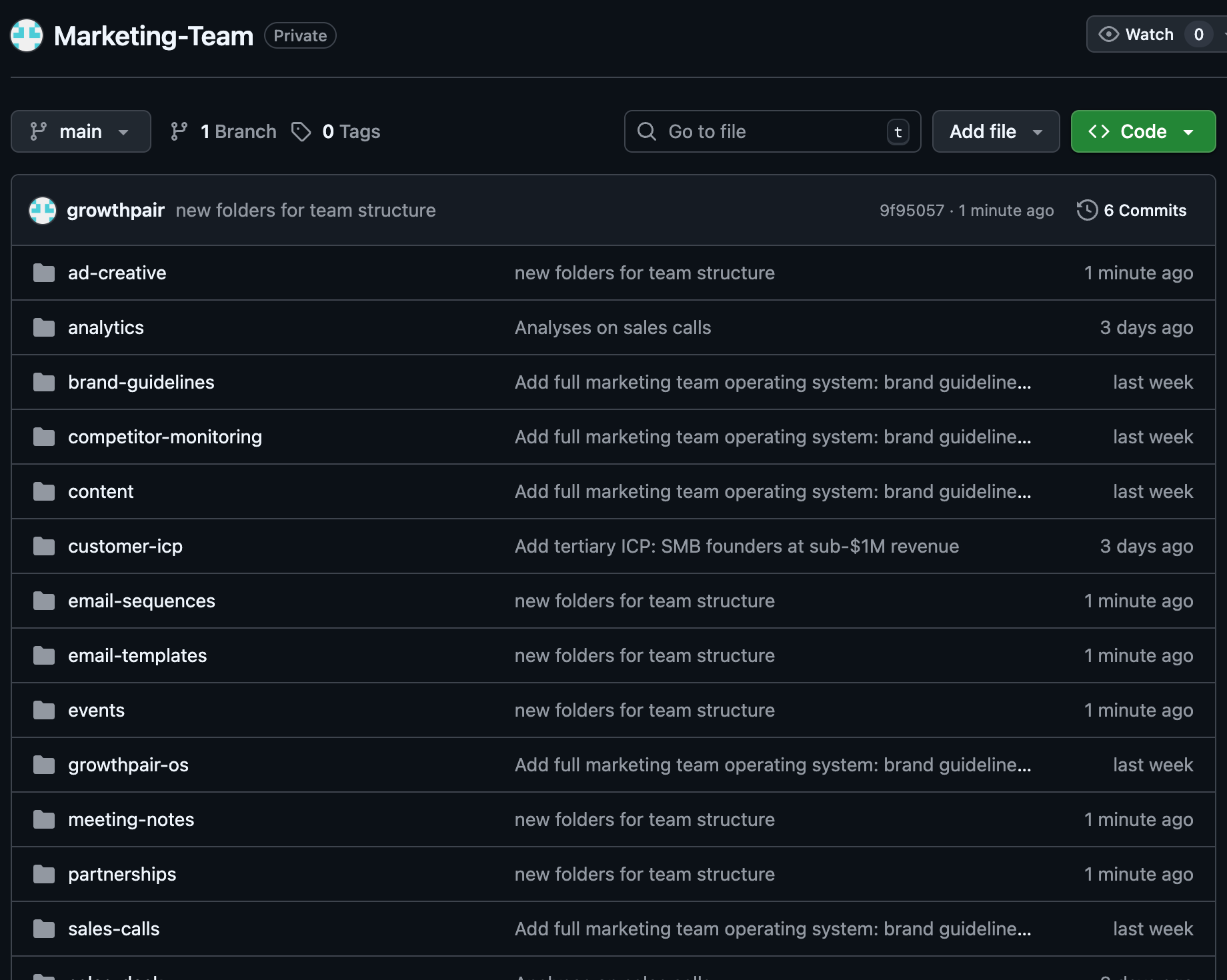
You may be asking, “So what’s the big deal?”
With this style of setup, I’m able to do 3 very important things:
House all marketing files within folders in one organized place
Track any changes that my team is making across files (aka, their commits)
Ensure my team has real time information on everything on the business
Those are the logistical pieces on maintaining a well organized team, but the fun is really when you’re using Claude Code with this repo.
Now, I can prompt Claude Code with things like:
Analyze all sales calls from last 7 days, along with our website messaging to find gaps in our positioning
Using our best performing email headlines, create 10 new test variations for our new product launch
What did I miss from my team meetings after being out the last 2 weeks
Here’s an example of a prompt I ran directly through Claude Code:
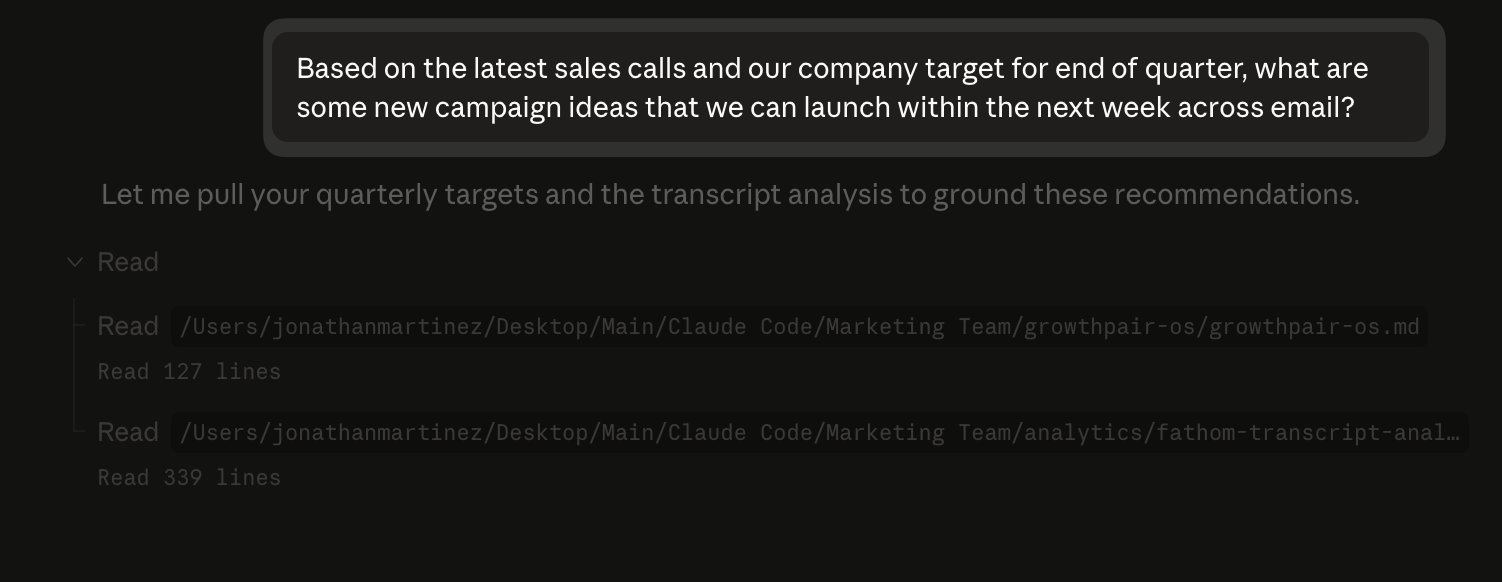
The beauty of this prompt example is that it takes details from various sources all living across folders within the repo. This would have taken me hours to find the right files, put it all together and come up with campaign ideas previously.
In a hypothetical world where I’m working at a company, I now don’t have to go running to the sales team for their latest sales call transcripts, or to the CEO for the company goals.
Context sharing. Real time view of the business. Analyzing information between various folders/ files. It’s all possible now with this setup.
Okay cool, how can I set this up?
I’ve filmed an entire video lesson on Claude Marketers on how to do this, but I’ll demonstrate how easy it is to setup here:
Create a folder on your desktop and connect it to Claude Code
Prompt Claude Code with something like this: I want to start running my marketing team on Github/ Claude Code. The idea is to organize our brand guidelines, sales calls, etc in different folders. The entire team can access this and update the folders with access to the repo on Github. Can you ask any questions necessary and help me set this up so that we have the right foundation to get this kicked off
Claude Code will ask questions and guide the setup for your folder structure
Create a repo on Github (important: make it private)
Give Claude Code the Github repo link and it’ll create your initial commit
Add your teammates to repo in Github (Repo Settings > Collaborators > add their GitHub usernames)
Using Github Desktop, click “Add Local Repository” and navigate to your marketing team folder that Claude Code created
It’ll detect the existing repo, and then you can hit “Push origin”
As I’m writing this out, I realize that the video lesson I’ve filmed will likely give much more color on how to do this. It may seem technical, but I promise as you get going it’ll be very doable.
The video lesson for setting up a Github repo is in “Claude Code for Marketers” module and titled “Deploying Your App: GitHub, Railway, Apify & Google Auth.” And for the video lesson on this exact essay, you can go to the “Building Your Marketing Team on Claude” module.
Why I’m so hyped
Now that you have an understanding on why I built this, how to do it yourself and the advantages, here’s why I’m truly hyped…
I see a world in the not-so-distant future where orgs like marketing can operate insanely efficient with shared context that’s easily accessed.
Everything from human talent, to AI agents accessing and building out campaigns and more through a Github repo and Claude Code.
It used to take ages to find docs, connect dots between data and ship with speed. You’d need tons of resources and an insane dedication to documenting.
Now, teams with <5 people and those with 100+ can move much faster and truly 10x their outputs. I hate 10x term because it’s so cliche, but it’s true. It all starts with a durable foundation though, and I believe this is the one for the future.
Very interesting concept. I wonder if this can be extended to any business SharePoint / filesystem
Great read - The big bottleneck in marketing is fragmented context and this invited some infrastructure level thinking in- cant wait to start using Github more